
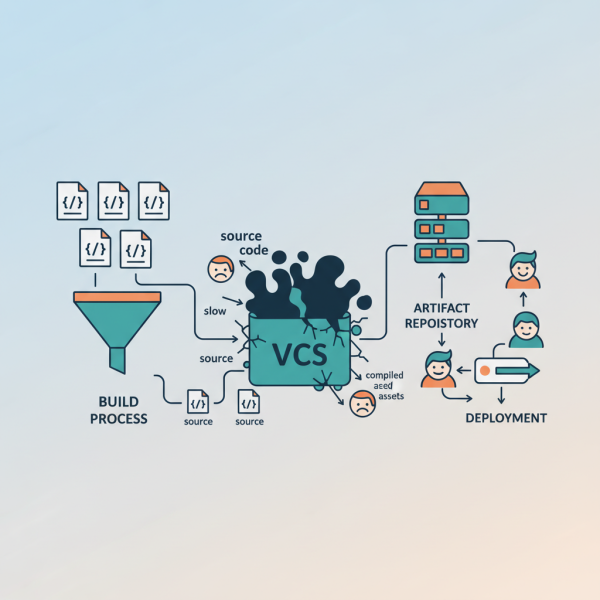
Why Version Control Isn't the Right Fit for Compiled Assets
What you'll learn
 Version Control LimitationsArtifact ManagementBuild AutomationDependency Management
Teams rely on tools like Git, SVN, and Mercurial to track changes, collaborate seamlessly, and maintain a historical record of their codebase. However, a common pitfall, especially for new teams or those scaling rapidly, is the temptation to include compiled assets directly within their version control system. While seemingly convenient at first glance, this practice introduces significant technical debt and operational inefficiencies that can cripple a development team's productivity and repository health.
The Pitfalls of Versioning Compiled Assets
The primary function of a version control system (VCS) is to manage changes to source code and other text-based files efficiently. Compiled assets, which are typically binary files, fundamentally clash with this design philosophy, leading to several critical issues.
Binary Blobs and Diffing Issues
Version control systems excel at performing diffs (comparing changes) on text files, allowing developers to see line-by-line modifications. This capability is virtually non-existent or meaningless for binary files. A single change in the source code can result in a completely different binary file. Consequently, the VCS stores entire new versions of the binary rather than incremental changes, leading to massive repository growth. This "binary blob" problem makes it impossible to review changes effectively, understand history, or resolve conflicts in a meaningful way.
Redundancy and Build System Conflicts
Compiled assets are, by definition, outputs of a build process from source code. They are not source themselves. Storing them alongside their source code in a VCS creates redundancy. If the source code can generate the asset, there's no need to store the generated artifact. This practice often leads to inconsistencies, where the compiled asset in the repository might not perfectly align with the version that would be generated from the checked-in source code due to different build environments or missing dependencies. It also bypasses the automated build pipeline, introducing a potential for non-reproducible builds.
Performance Degradation
Large binary files significantly bloat the repository size. Cloning, pulling, and pushing operations become much slower, consuming considerable network bandwidth and local disk space. For large projects with many compiled assets, this can make routine VCS operations excruciatingly slow, impacting developer iteration times and the overall efficiency of CI/CD pipelines. Repository backups also become unwieldy and time-consuming.
Developer Experience
When multiple developers work on a project, merge conflicts are inevitable. While text-based conflicts are typically resolvable, binary conflicts are often intractable. Developers are forced to choose one version over another, potentially losing valid changes or introducing errors that are hard to trace. This adds significant frustration and overhead, detracting from productive development work.
The Core Principle: Compiled Assets are Derived Artifacts
At the heart of the issue is a fundamental principle: source code is the single source of truth. Compiled assets are derived artifacts—they are the result of applying a specific build process (compiler, linker, packager, etc.) to that source code. If the source code and the build process are properly managed, the compiled assets can always be reproduced. This distinction is critical for maintaining a clean, efficient, and reproducible development workflow.
Effective Strategies for Managing Compiled Assets
Instead of polluting version control systems with compiled assets, modern software engineering practices leverage a combination of specialized tools and processes. These alternatives offer superior control, traceability, and efficiency.
Automated Build and Continuous Integration (CI)
The cornerstone of effective compiled asset management is an robust automated build system, typically integrated into a Continuous Integration (CI) pipeline. Whenever changes are pushed to the source code repository, the CI system automatically compiles the code, runs tests, and produces the final compiled artifacts. This ensures:
- Consistency: Every build is performed in a standardized environment.
- Reproducibility: Any specific version of the source code can reliably generate its corresponding compiled assets.
- Timeliness: Assets are always fresh and reflect the latest source code.
Artifact Repositories (Binary Repositories)
Dedicated artifact repositories, such as JFrog Artifactory, Sonatype Nexus, or GitHub Packages, are purpose-built for storing, versioning, and managing binary artifacts. Unlike VCS, they are optimized for handling large binary files and provide functionalities crucial for enterprise-grade asset management. Key advantages include:
- Centralized Storage: A single, authoritative location for all built artifacts, whether internal components or third-party dependencies.
- Immutable Versions: Once an artifact is published, it is immutable, ensuring that builds are always consistent.
- Rich Metadata: Support for storing comprehensive metadata about each artifact, including its source, build details, and dependencies.
- Advanced Features: Granular access control, security scanning, replication, and integration with various package managers (Maven, npm, Docker, NuGet, PyPI).
- Efficient Retrieval: Optimized for fast downloading and serving of artifacts to build systems and deployment environments.
Dependency Management Tools
For projects that consume external or internal compiled libraries, robust dependency management tools are essential. Package managers like Maven (for Java), npm (for Node.js), pip (for Python), and NuGet (for .NET) allow teams to declare and resolve project dependencies. These tools work in conjunction with artifact repositories to fetch specific versions of required compiled assets, ensuring that builds are reproducible and consistent across all development environments.
Clear Build Instructions and Tooling
Every project should have clear, documented, and ideally automated build scripts. These scripts (e.g., Makefiles, Gradle, custom shell scripts) define precisely how to transform source code into compiled assets. This ensures that any developer can check out the source code, run a command, and produce the identical compiled output that the CI system would generate, fostering a culture of "build it yourself" from source rather than relying on pre-compiled binaries from the VCS.
Implementing Alternatives in a Development Team
Adopting these practices requires a concerted effort and clear communication:
Educate the Team: Explain the fundamental differences between source code and compiled assets and why dedicated artifact management is crucial for scalability and maintainability.
Standardize Tools: Select and implement an artifact repository and a CI/CD system that integrates well with your existing development stack. Ensure all teams use the same set of tools and follow standardized workflows.
Automate Everything: Wherever possible, automate the build, test, and publishing processes for compiled assets. This reduces manual errors and ensures consistent adherence to best practices.
Establish Clear Policies: Define explicit guidelines on what types of files belong in the version control system (source code, configuration files, build scripts) versus what belongs in the artifact repository (compiled binaries, libraries, deployment packages).
Summary
Including compiled assets in version control systems is a practice fraught with technical debt, performance bottlenecks, and operational headaches. Software Engineering Managers must recognize that VCS is optimized for source code, while compiled binaries are derived artifacts. By embracing automated build pipelines, leveraging dedicated artifact repositories for storage and versioning, and employing robust dependency management tools, development teams can establish a clean, efficient, and reproducible workflow. This strategic shift not only improves repository health and build performance but also significantly enhances developer experience and the overall reliability of software delivery.
Comprehension questions
 Why are traditional version control systems poorly suited for managing compiled binary assets?What is the core principle that differentiates source code from compiled assets in the context of version control?Name at least three key advantages of using an artifact repository compared to a standard version control system for compiled assets.How do Continuous Integration (CI) and automated build processes contribute to effective management of compiled assets?